What to do with your wedding photos once it's all over
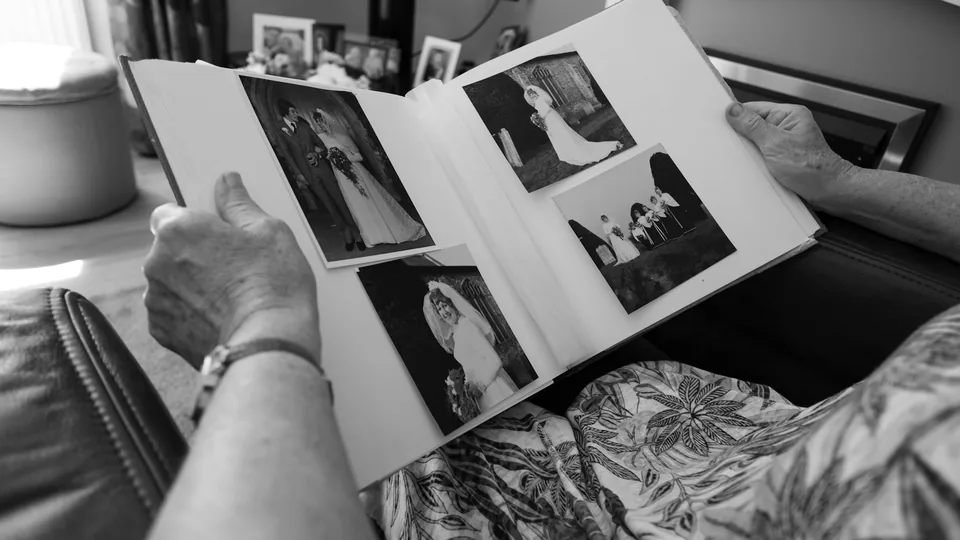
Nobody warns you about this: the strange part isn't the wedding. It's the following Tuesday.
It's over. You have eight hundred photos spread across your phone, your spouse's and a folder the photographer sent. And that's where they'll stay unless you do something.
Here's what to do with your wedding photos so that twenty years from now they're still somewhere you can look at them.
The Tuesday after comes with a small sadness
For months everything pointed to one date. There were fittings, messages, payments, decisions about flowers you never imagined making and a to-do list that seemed to reproduce overnight.
The wedding happens. It's intense, fast and full of people. Then comes the quiet.
You open your phone looking for a little of that feeling and find an impossible mix: screenshots of the weather forecast, pictures of the bouquet, thirty near-identical shots of the head table, a dark selfie and the departures board on the way home. Meanwhile folders, links and messages saying "I'll send you the rest when I have a minute" start to arrive.
You don't have to turn it all into an album that week. In fact, I wouldn't. Exhaustion makes terrible decisions. But two things are worth doing soon: gather the files and secure any downloads that have a deadline.
The mistake of leaving everything in the cloud and hoping
A cloud folder is useful. It isn't a finished keepsake.
When you upload hundreds of photos with no order, you feel like you've done your part. They're "saved." Then two years go by, and the folder is called WEDDING FINAL 3, contains four versions of the same picture and depends on an account that's running out of space.
The cloud doesn't decide for you what deserves to be seen, either. It stores. Nothing more.
There's another risk: confusing access with a backup. If every photo lives in a single service and you lose the account, stop paying for storage or delete a synced folder, you're in for a nasty surprise. For the pictures that matter, apply a simple rule: keep more than one copy, and not all in the same place.
For example:
- A main folder on your computer.
- A copy on an external drive.
- Another copy in a cloud service.
You don't need a data center in the living room. You only need to make sure a lost phone isn't the one home of the photo with your grandmother.
Before choosing: one afternoon to gather and sort
Pick a specific date before the month is out. Sit down at the computer and go in this order:
1. Download anything that expires first
If you used EventGuestBook with Pro, the photo ZIP can be downloaded for a limited time after the event (currently 90 days). Do it when you get back from your honeymoon, or set a reminder. The PDF book and the complete online book are part of Pro too. Don't leave them as an open-ended task.
2. Create a folder per source
Start without mixing:
- Photographer.
- Guests.
- Your own phones.
- Photo booth.
- Close family.
This lets you spot duplicates and respect the photographer's work, which may come with specific terms for use and sharing.
3. Don't rename eight hundred photos by hand
Keep them by date and source. If you make a selection later, rename only the chosen ones. The goal isn't to win an archiving award. It's to be able to find them.
4. Make three selections
I think of it as three boxes:
- The full story. Everything you want to keep, even if it isn't perfect.
- Favorites. Fifty to a hundred pictures you'll actually look at again.
- Prints. Twenty or thirty that deserve to leave the screen.
A photo can be in all three. Selecting doesn't delete the rest. It creates ways in that don't require wading through eight hundred files.
Three things that do work after the wedding
Choose the one that most resembles how you keep memories and, if you can, combine a digital option with a physical one.
1. Make a book with photos and messages
A book puts the day in order. It gives it a beginning, a rhythm and an end. And when guest photos arrive together with their messages, it does something a folder can't: it remembers who was speaking and why that scene mattered.
Picture a page with a photo of your friends at their table and, underneath: "This was taken right after we told Laura we'd hidden her shoes." Without the text you see people laughing. With the text you're back at the table.
With EventGuestBook, Pro lets you download a laid-out book as a PDF. Premium adds an editable PPTX file you can open in PowerPoint or import into Canva (you don't get a native Canva project).
The PDF gives you a composed version you can keep and print. The PPTX is for adjusting pages, moving elements or preparing another version. The platform optimizes photos on upload, so judge the printed result with a test copy before you order many.
You can browse finished sample books and compare the options on the pricing page.
How to organize the book without being a designer
Start by telling the story of the day, not by choosing fonts.
-
Cover. Your names, the date and a picture that represents you.
-
Before the ceremony. Getting ready, arrivals and messages from the people who were with you from early on.
-
Ceremony. A short selection from the photographer, respecting their usage terms.
-
Cocktail hour and tables. This is where guest photos and their messages come in strong.
-
Speeches and dancing. Alternate wide shots with more intimate pages.
-
The end. The last photo of the night, a special message or the picture of the group that lasted until breakfast.
Let the pages breathe. One large photo usually has more impact than six small ones. Don't try to include every picture to justify having kept it. The full archive can live elsewhere.
And keep a copy of the PDF outside the platform. A downloaded document can be duplicated, moved to a drive and printed again whenever you like.
2. Put together a small shared album
"Small" is the important word.
Your relatives don't need to browse all eight hundred photos. Create an album with sixty to eighty pictures and share it with the people close to you. Include a mix: the main moments, several groups, details and a few scenes that show what the party was like.
Avoid treating the family album as an automatic public release. Ask before including sensitive pictures, children or situations someone might prefer to keep private. A photo existing at the event doesn't mean it should circulate without limits.
You can order the selection in chapters: "Before," "Ceremony," "Tables," "Party," "Last ones standing." Add context to ten or twelve key photos.
This album is for sharing. It doesn't replace your backups or the book. It's the version your mom can open without calling to ask which folder it's in.
3. Print a few
Here I'll be firm: print some.
You don't need a huge album or a house covered in frames. Choose twenty photos. Print a small box of them, a strip for the fridge, two copies for your parents and one picture to keep on display.
Printed photos show up in daily life. You find them when you open a drawer, show them during a visit and pass them from hand to hand. They don't depend on remembering a password or on the TV agreeing to connect.
To choose, look for variety:
- One of the two of you.
- One of each important branch of the family.
- One with friends.
- A portrait of the older relatives.
- A candid scene.
- A detail of the venue.
- One from the end.
Don't select on perfection alone. That slightly blurred photo of your dad may have more life than the flawless posed one. Printing isn't a technical exam. It's a way of deciding what you want to come across ten years from now.
Before ordering a large format, get a test print. Screens glow, and paper responds differently. Check color, contrast and cropping, especially if the picture came from a guest's phone.
The detail that changes the album: the words next to it
Photos remember the scene. Messages remember the voice of the person who was there.
When you collect both together from the start, you don't have to reconstruct later who sent what. You can put a sentence under a picture, open a chapter with a message or close the book with several short notes.
There's no need to fill every page with text. Choose words that add something:
- What happened right before the photo.
- Why that person wanted to share it.
- An old memory connected to the scene.
- A wish for your life after the wedding.
Skip the generic lines if you already have more personal ones. "Wishing you every happiness" is kind. "I still can't believe you were on time for your own wedding" belongs only to you.
This is where a guest book with photos parts ways with a gallery. It doesn't only show what the day looked like. It keeps how your people told it.
A realistic timeline so it doesn't stay half done
Don't try to solve everything the moment you're back. Split it up:
First week
Say thank you, ask for the missing photos and download anything with an expiration date. Make copies. No designing.
First month
Gather, delete obvious duplicates and create your three selections. Share a small album with family and friends.
Before the download window closes
Download the photo ZIP from EventGuestBook if you have Pro. Review the PDF, keep a local copy and prepare the book you want to print.
First anniversary
Open the book. Print the photos you haven't printed yet. It's a lovely way to finish the job if life got in the way.
Frequently asked questions
How long should I wait before sorting the photos?
Rest for a few days, but gather and download the files within the first month. Selection decisions can wait a little longer.
How many photos should a shared album include?
Sixty to eighty is usually a comfortable number for telling the story of the day without tiring anyone. Keep the full collection in your private copies.
How many photos are worth printing?
Start with twenty or thirty. You're more likely to look at them, and you can always add more later.
Can I make a book if I can't design?
Yes. A laid-out PDF (included in Pro) means you don't start from a blank page. With Premium you can also download an editable PPTX and import it into Canva to adjust the result.
Is the online book included in the free Demo?
Partly. Demo lets you open and share the online book with its messages (up to 5) and the standard design. The complete online book with your design, the photo ZIP and the book downloads are part of Pro.
How long do I have to download the photos?
The download is available for a limited time after the event (currently 90 days). Don't rely on remembering: set a reminder.
Should I mix the photographer's photos with guests' photos?
You can combine them in a personal selection if your contract allows that use, but keep the files separated by source and always respect the professional's authorship and terms.
How do I keep the photos safe for the future?
Keep at least two copies in different places, for example an external drive and the cloud. Check every so often that you can still open them.
Make a keepsake, not another folder
The wedding has happened. You don't have to stretch the to-do list forever. Choose an afternoon, prepare a selection and let the photos become something you can actually open.
If you're still collecting pictures and messages, create your event for free and try it out. If you already have them, look at the plans for preparing the book and the downloads. Then print one. The one that made you stop while you were reading this.
Related articles
Digital guest books for wedding planners: how to offer one to your couples
An extra that adds no logistics to the wedding day if you plan it well: who creates it, when to set it up, how to show it on a screen and which plan suits each couple.
7 min
Messages, photos and voice notes: what your wedding keepsake looks like when guests give all three
A message tells you what someone thinks, a photo shows how it felt and a voice note gives you their voice back. Here is how your wedding keepsake changes when guests leave all three.
8 min
How to get guests to sign your wedding guest book
Participation is a matter of friction and timing, not nagging. What actually moves the needle before, during and after the wedding.
8 min