How to put QR codes on your wedding tables
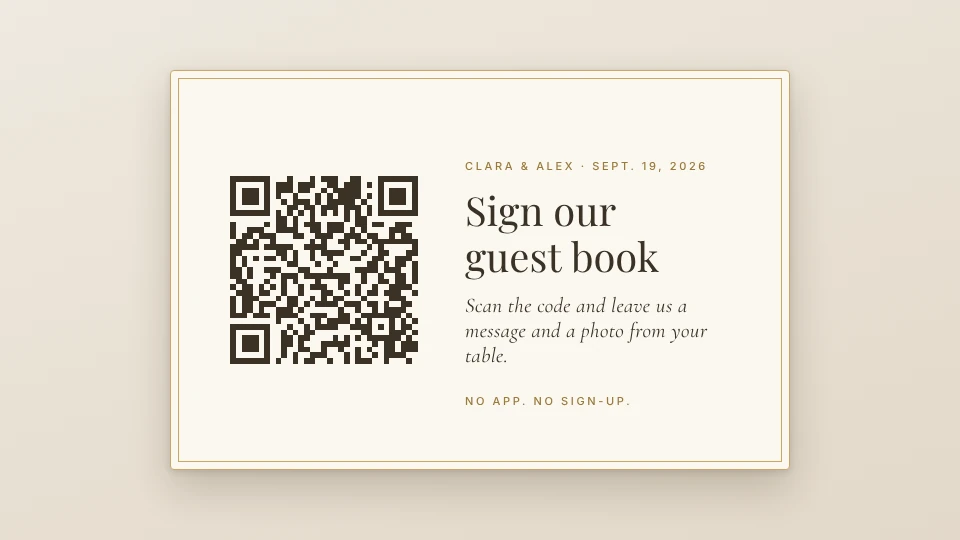
If you're using a digital guest book at your wedding, the QR code is the piece everything depends on. It's the bridge between your guests and your book, and getting it right is the difference between a handful of messages and a full book. This guide covers, step by step, where to place it, how big to make it, what to write next to it and which mistakes to avoid.
Why the QR code matters (and why most people get it wrong)
A badly placed QR code is simply invisible. Too small, tucked in a corner, with no line inviting anyone to scan it... and half the wedding never finds out it exists.
A well-placed one gets seen, understood and scanned without thinking. That's what drives participation. The difference between the two usually comes down to a couple of very specific details.
The right size for the QR code
Write down the golden rule: the code should be at least 2 inches (5 cm) on each side. Below that, modern phones can still read it, but people have to get very close and focus patiently, and many guests give up first.
- 2 × 2 in (5 cm): the acceptable minimum, fine for small tables.
- 3 × 3 in (7 cm): ideal for cards at each place setting.
- 4 × 4 in (10 cm): perfect for a central sign on large round tables.
- 8 × 8 in (20 cm) or more: for the photo backdrop or a board at the entrance.
One more thing: print the code at good quality (at least 300 dpi). A pixelated code from a tired printer may refuse to work on the day that matters.
Sign design: minimal and clear
Your QR code shouldn't sit there bare and alone. It looks much better with:
- A clear line inviting people to scan.
- White space around the code (leave a margin of about half an inch).
- Elegant type that matches your invitation.
- One visual touch (a floral detail, a hint of gold, a sprig of greenery) that fits your style.
Less is more: too many elements distract. A QR code + a line + your names + the date is more than enough.
Wording that works (and wording that doesn't)
Lines that invite people to scan
- "Scan us. We want your message."
- "Sign our digital guest book. Scan, write, send."
- "Leave us a memory of today. Scan and write what you feel."
- "Your message stays with us forever. Scan here."
- "No app. No sign-up. Scan, write and sign."
Lines that DON'T work
- "QR code for digital guest book." Too technical.
- "Please scan the code." Sounds like a form at the DMV.
- No line at all. Only the code. People stare at it without knowing what to do.
Where to place the QR codes
The best trick: spread them across several spots and don't rely on one. The more touchpoints, the more messages.
Option 1: on every table (the best)
A small sign (about 4 × 6 in) in the middle of each table, next to the table number or the centerpiece. Guests see it while they wait for the first course and sign right there, with no rush.
Option 2: at every place setting
A personalized card with the guest's name on one side and the QR code + line on the other. It works beautifully and looks very elegant.
Option 3: at the entrance
A large welcome board with the code. A good second spot, but on its own it falls short on participation.
Option 4: at the photo backdrop
Here you have an advantage: people already have their phones out. If they sign right after taking the picture, they often add that same photo to the book.
The winning combination: tables + photo backdrop. That covers nearly every moment when a guest has a phone in hand.
Recommended materials
- Rigid foam board (3/16 in). Affordable and good-looking.
- Acrylic. More premium, ideal for weddings with room in the budget.
- Wooden or gold frames. They look lovely and can be reused.
- Professional printing. Better than printing at home: it makes sure the code scans.
Doing it yourself? Use heavy card stock and a laser printer (inkjet ink can smudge and let you down).
How to test it before the big day
Please don't skip this step. The last thing you want is to find out at the event that the code won't scan.
- Print a test sign at actual size.
- Try it with at least 3 different phones (an older Android, a recent iPhone, a tablet).
- Try it in different light: daylight, warm and dim (typical reception lighting) and in shadow.
- Check that the page loads quickly and shows the signing steps properly.
- The definitive test: ask someone over 60 to scan it. If they manage without help, your sign passes.
Common mistakes to avoid
The classics that sneak in again and again:
- A code that's too small (under 2 inches).
- Printing it blurry or pixelated. Always high resolution.
- Forgetting the inviting line. A bare code doesn't pull anyone in.
- Putting it only at the entrance and forgetting the tables.
- Placing it under glass with reflections. Some phones struggle with glare.
- Hiding it in the menu or in programs people close after two seconds.
- Not testing it first. Already said, but it's THE important one.
- A black code on a dark background. Always high contrast, ideally black on white or cream.
Templates and examples
Don't feel like designing from scratch? Canva has plenty of templates if you search for something like "wedding QR code sign." Edit the text, upload the QR code from your guest book and print.
A good template includes:
- Your names
- The date
- A large, centered QR code
- A short inviting line
- One subtle visual detail (greenery, gold, a flower)
For wording by style, see these wedding QR code sign ideas.
The takeaway
The QR code is the bridge between your digital book and your guests. A good size (at least 2 inches), a clear line, several placements and a test beforehand: that all but guarantees participation. Don't underestimate this small detail: it's exactly what separates a nearly empty guest book from a full one.
FAQ
Do I need a different QR code for each table? No. The same code works for all of them. The only thing that changes is how many signs you print.
What if someone doesn't have a phone? The easiest fix: a relative or friend helps from theirs. The message is still signed with the guest's own name.
Does the QR code stop working after the event? No. The code keeps pointing to your book. It keeps accepting messages after the event on any plan (on Demo, until it reaches 5 messages). If you want it to stop, you can deactivate the event from the dashboard.
How much does it cost to print the signs? It depends on the material, the finish and the printer you choose. Ask for a quote for your exact number of tables: these are small signs, so they're usually one of the cheapest items in your wedding stationery.
Want to see what your digital guest book would look like? Start for free and have your QR code ready in 5 minutes. See plans and pricing or find out how it works at weddings.
Related articles

Digital guest books for wedding planners: how to offer one to your couples
An extra that adds no logistics to the wedding day if you plan it well: who creates it, when to set it up, how to show it on a screen and which plan suits each couple.
7 min
Messages, photos and voice notes: what your wedding keepsake looks like when guests give all three
A message tells you what someone thinks, a photo shows how it felt and a voice note gives you their voice back. Here is how your wedding keepsake changes when guests leave all three.
8 min
How to get guests to sign your wedding guest book
Participation is a matter of friction and timing, not nagging. What actually moves the needle before, during and after the wedding.
8 min